The fastest way to get a free restaurant website with menu and online reservations live is to pick one of three routes: a venue-focused booking platform, a general website builder with a booking widget bolted on, or a reservation mini-site. For most owners who want confirmed bookings without giving up control, a venue-focused platform like Served is the strongest direct option. Builders win on design freedom; mini-sites win on speed. Pick based on how much you'll actually customise.
TL;DR:
- Venue-focused platforms like Served offer ownership of guest data and flat subscription costs, making them ideal for high-volume or repeat booking venues.
- Builder-based websites provide greater design flexibility but often require paid upgrades for features such as deposits, SMS reminders, or payment integration.
- Mini-sites deliver quick setup within minutes but limit customization and long-term data portability, suitable for small venues with minimal needs.
- Before choosing a platform, verify data export options, calendar sync, booking confirmation reliability, and post-free pricing structures to avoid unexpected costs.
- Rapid deployment is achievable by preparing menus, photos, and policies beforehand and conducting end-to-end testing of the booking and confirmation processes.
Table of Contents
- Which free options let you host a menu and take table reservations?
- Comparing the free options that actually include reservations
- What to check before choosing a free platform
- How to publish a free site with a menu and reservations in an hour
- Why venues choose Served for free tools and commission-free booking
- The part most guides get wrong
- Sources
- FAQ
Which free options let you host a menu and take table reservations?
Three categories cover almost every "free" option you'll find. Each solves the same brief differently, and the right one depends on how big your venue is, how often you turn tables, and how much you care about owning your booking data.
Venue-focused booking platforms are built specifically for restaurants, bars and cafes. They combine a menu, a booking calendar, and guest management in one system, and the good ones don't take a cut of every reservation. This category often features a flat subscription instead of commission, real-time menu edits, and a booking interface designed around table turns rather than generic calendar slots. If you rely on reservations as a core part of service, this is the category to start with.
General website builders with booking widgets — the likes of Canva or Wix — give you far more design flexibility. You can build a fully branded site with a free tier, then drop in a booking widget. The catch is that free plans typically cap advanced booking or payment features, so you may hit a paywall the moment you want deposits, SMS reminders, or POS syncing. This suits venues with strong design opinions and a bit of patience for setup.
Reservation-app mini-sites are the fastest route to live. Products like resmio offer a ready-made one-page site with a booking widget built in, often live within minutes. You trade customisation and long-term data portability for speed, which works fine for a small café that just needs a phone number, a menu, and a "Book a table" button.
- Small independent, low table turnover: a mini-site is usually enough.
- Growing restaurant reliant on nightly bookings: a venue-focused platform pays off fastest.
- Multi-location or brand-heavy operation: a builder gives room to grow, provided you budget for upgrades.
Comparing the free options that actually include reservations
The differences between categories show up clearest side by side. Setup speed, editing effort, and what happens once you outgrow the free tier all vary sharply.
| Category | Provides menu + booking on site | Cost model | Time to set up | Menu editing | Reservation features | Best for |
|---|---|---|---|---|---|---|
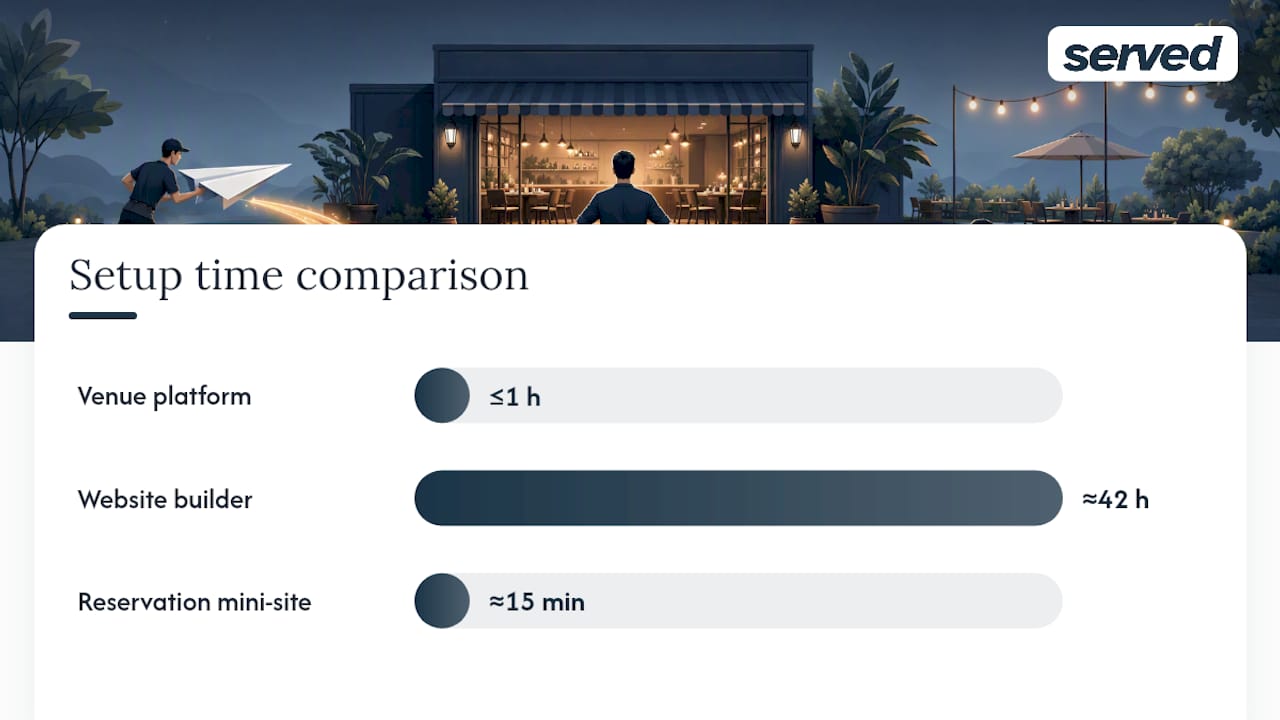
| Venue-focused platform (e.g. Served) | Yes, native | Flat subscription, no commission | Under an hour | Real-time, no code | Confirmations, reminders, guest limits | Venues that live on repeat bookings |
| General website builder | Yes, via widget | Free tier + paid upgrades for advanced features | Half a day to a few days | Manual, drag-and-drop | Basic widget; deposits/SMS often paid | Owners who want full design control |
| Reservation mini-site | Yes, one-page | Free basic, paid tiers for extras | Minutes | Simple text or PDF upload | Basic booking, limited customisation | Very small venues needing speed |
Hidden costs are where "free" gets complicated. Builders commonly charge for domain names, payment processing, or POS integrations once you move past the basic template. Some booking widgets add a per-reservation or transaction fee even on a "free" plan, which erodes the point of choosing free in the first place.
Three quick takeaways: if reservations are central to your revenue, go straight to a venue-focused platform and skip the trial-and-error. If your brand needs a distinct look and you have time to build it, a general builder is worth the extra setup hours. If you just need a booking button live today, a mini-site gets you there before lunch.
What to check before choosing a free platform
Not every "free" option treats your data, your guests, or your money the same way. Run through this before you commit.
- Data ownership and export. Can you download your guest list and booking history if you leave? Guest data is often the most valuable asset a venue has for remarketing and rebookings, so a platform that locks it away is a real cost, not a convenience.
- Calendar sync. Does it sync with the calendar you already use, or does it create a second system to check?
- Confirmations and reminders. Automated confirmation emails or texts, plus reminders, are what actually cut no-shows.
- Deposit and no-show controls. Can you take a deposit or card hold for larger groups?
- POS and Stripe integration. Does payment or ordering data flow anywhere useful, or sit in isolation?
- Human support. Is there someone to call when a booking fails at 7pm on a Friday?
Before signing up, ask directly: what does it cost once you outgrow the free tier? How do cancellations and deposits actually work? Where is guest data stored, and how do you export it?
Red flag: any platform that's vague about post-free pricing or won't confirm data export in writing.
Pro Tip: Run a test booking as a guest before you go live. Book a table, cancel it, and check whether the confirmation email, the calendar update, and the no-show flag all fire correctly. A broken confirmation is the single most common reason free booking setups quietly fail in week one.
How to publish a free site with a menu and reservations in an hour
Getting live fast depends more on having assets ready than on the platform itself.
Before you start, gather:
- Logo and a handful of good food/venue photos
- Menu text (dishes, prices, allergens)
- Opening hours and contact details
- Table layout or seating capacity
- Cancellation or deposit policy, if you have one
Then follow four steps:
- Choose a category and sign up. Pick a venue-focused platform, builder, or mini-site based on the comparison above, and create your account.
- Build and publish the menu. Use an editable format rather than a static PDF wherever you can, since real-time edits mean you're never caught out by a sold-out dish. Add a QR code version for tables if the platform supports it.
- Add the reservation widget and test it. Set your table limits, opening hours, and any deposit rules, then place the widget where guests will actually see it, not buried in a submenu.
- Publish and claim your listings. Go live, then claim or update your Google Business Profile and any directory listings so the new booking link is everywhere guests search.
Before calling it done, test: a full booking end-to-end, the confirmation message wording, calendar sync against your existing system, and whether you can export a guest record. Digital reservation tools cut manual booking time and reduce no-shows largely because these small mechanics work properly, not because the site looks good.
Why venues choose Served for free tools and commission-free booking
Served's model is a flat subscription rather than commission on every table, so your bookings stay yours and your costs stay predictable as reservation volume grows. That matters most for venues where a busy Saturday shouldn't mean a bigger bill.
The platform includes real-time menu updates, so a sold-out special or a price change goes live instantly rather than waiting on a web developer. Support comes from actual humans rather than a ticket queue, and the Growth Scan audits your current online visibility to flag exactly what's holding back bookings, before you commit to anything.
Venues typically report higher visibility and more direct bookings once search and booking paths are cleaned up. If you're weighing a move from another system, switching support is built to make that transition low-friction rather than a fresh setup from scratch.
The part most guides get wrong
Most advice on this topic treats "free" as a single tier, when it's really three different bets. A mini-site bets on speed and accepts you'll rebuild later. A builder bets on design and accepts a slower path to a working booking flow. A venue-focused platform bets on ownership, betting that keeping your guest data and your bookings under one roof pays off faster than either alternative.
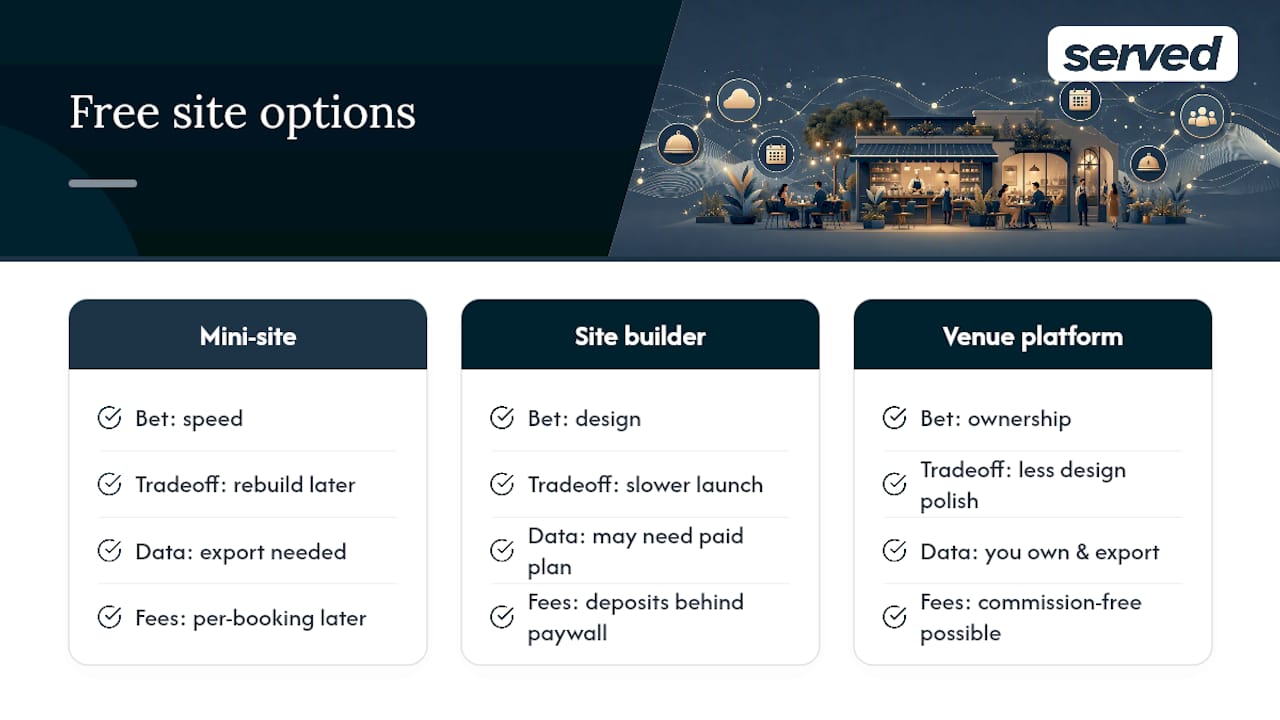
The conventional advice, "just get any free website up," skips the question that actually determines whether the site earns its keep: what happens to your guest data and your booking fees once you're doing real volume? A free mini-site that charges per booking later isn't free. A builder that needs a paid plan for deposits isn't finished at signup.
Prioritise data ownership and export before design polish. A plain page with a working, commission-free booking button beats a beautiful site that locks your guest list behind a paid tier. Test the booking flow yourself before trusting it with a Saturday night.
— Ignacy Jurkowski
Sources
FAQ
What is a good free booking system for restaurants?
A venue-focused platform with a flat subscription and no commission, like Served, is the strongest free-to-start option because it keeps bookings under your control without per-reservation fees eating into growth.
What is the best free website to create menus for restaurants?
There's no single "best" for every venue: builders like Canva or Wix suit owners who want design control, while venue-focused platforms and mini-sites get a basic menu live faster with less manual editing.
What is the best free restaurant ordering app?
This depends on whether you need ordering (takeaway/delivery) or table reservations. For reservations specifically, look for a platform offering confirmations, reminders, and guest limits rather than a generic ordering app repurposed for bookings.
Where can I find a free digital menu template?
Most website builders and venue-focused platforms include editable digital menu templates as standard, often with a QR code option for tables, so you rarely need a separate design tool.