The fastest way to win restaurant local SEO right now is a fully complete Google Business Profile, steady recent reviews, and a crawlable HTML menu. This afternoon, claim and verify your profile, publish your menu as real text rather than a PDF, and set up automatic post-visit review requests. Expect GBP movement within days to weeks; reviews and website changes take longer, usually weeks to months.
TL;DR:
- Completing and verifying a Google Business Profile, especially filling all fields and updating hours, can improve rankings within weeks.
- Using an HTML menu with schema markup increases discoverability for search engines and AI tools, unlike PDFs or images of menus.
- Consistently requesting and responding to reviews, especially on-site asks and automated follow-ups, enhances local prominence over time.
- Fixing inconsistent NAP details across key directories generally takes four to ten weeks to propagate, affecting visibility and bookings.
- Prioritizing local backlinks from community sources and ensuring accuracy in profiles greatly boosts relevance for voice and near-me searches.
Table of Contents
- Your prioritised local SEO checklist, first to last
- How do I optimise my Google Business Profile for local rankings?
- Why does your restaurant need an HTML menu instead of a PDF?
- How do I get more restaurant reviews without breaking the rules?
- How do I fix inconsistent business listings across directories?
- Which local keywords actually bring in diners?
- How long does it take to see local SEO results?
- What does a Growth Scan actually find?
- How do you win 'near me' and voice searches?
- Do social media and local influencers help restaurant SEO?
- What structured data should restaurants add beyond menu schema?
- What mobile experience do on-the-go diners actually need?
- Where do restaurants actually get local backlinks?
- A quick lesson from a common opening-week mistake
- Served: get your fixes prioritised, not guessed at
- Sources
- FAQ
Your prioritised local SEO checklist, first to last
Work in this order. Each step builds on the one before it, and skipping ahead wastes effort.
- Claim and verify your Google Business Profile (30 minutes). Nothing else matters until this is done and confirmed.
- Fill every field: hours, categories, attributes, menu link, photos (1 day). This is where most venues leave easy wins on the table.
- Publish an HTML menu on your website (1 day, or a week if you need a developer). PDFs and photos of menus don't get read by search engines.
- Turn on automated post-visit review requests (1 day to set up, ongoing after that).
- Audit your NAP details across major directories (1 week).
- Build out neighbourhood and dish-specific content (ongoing, monthly).
Delegate the GBP fields and photo uploads to whoever manages your floor bookings. They know the menu and the hours better than any agency. Save paid help for citation cleanup across dozens of directories. That's tedious enough to justify the spend.
Pro Tip: Screenshot your GBP dashboard today and again in 30 days. Owners who track this side by side spot which single field change moved the needle, instead of guessing.
How do I optimise my Google Business Profile for local rankings?
Treat your Business Profile as your primary storefront, not a footnote to your website. A 2026 study of 1.8 million profiles found that fully complete profiles rank around 19 positions higher on average and are three times more likely to appear in the top 10 results. That gap is the single biggest lever available to any independent venue.
Fill these fields in order of impact:
- Primary category: choose the most specific accurate option ("Italian Restaurant", not just "Restaurant"). Refining a generic category to a precise one often shifts Maps positions within a couple of weeks.
- Hours, including special hours for holidays and events, updated the moment they change.
- Menu link, pointing to your HTML menu page, not a downloadable file.
- Attributes like outdoor seating, wheelchair access, or reservations required.
- Photos, added weekly if possible, since fresh images act as an activity signal.
- Secondary categories, useful for capturing adjacent searches like "brunch spot" alongside "cafe".
Google Posts and the Q&A section work the same way; regular activity tells Google your listing is alive, not abandoned. Never stuff keywords into your business title ("Best Pizza Downtown Joe's") since this violates Google's own guidelines and risks suspension. Expect visible movement in maps rankings within two to four weeks of a completed profile, though category changes sometimes show faster.
Why does your restaurant need an HTML menu instead of a PDF?
Search engines and AI recommendation tools read text, not images. A PDF menu or a photo of your specials board is invisible to the crawlers that decide whether you show up for "birria tacos near me" or "best omakase downtown". Menu language that matches how people actually search increases discoverability across both search engines and AI tools, and menus remain the primary sales tool that shapes booking and ordering decisions.
Structure your menu page properly:
- Use real HTML text for dish names, descriptions, and prices, not embedded images.
- Add Restaurant and Menu schema markup so search engines understand which text is a dish, a price, and a category.
- Title tags should combine dish or cuisine type with neighbourhood, such as "Wood Fired Pizza in Clerkenwell".
- Compress photos properly. Oversized images are the most common cause of slow mobile load times.
- Check Core Web Vitals in Google Search Console monthly; a sluggish mobile menu page loses diners before they see a single dish.
To check whether your menu is actually being indexed, search Google for a distinctive dish name plus your restaurant name. If your page doesn't appear, the menu isn't being read properly, and that's costing you dish-level searches you should be winning by default.
How do I get more restaurant reviews without breaking the rules?
Review velocity and recency both influence local rankings, and they influence whether a browsing diner actually books. Never offer discounts or freebies in exchange for reviews. That breaches most review platforms' terms and can get listings penalised.
The reliable system combines two channels:
- In-person asks from front-of-house staff at the end of a good meal, timed while satisfaction is highest.
- Automated post-visit requests sent by text or email a few hours after the booking, capturing guests who forget once they're home.
Respond to every review within 48 hours. Thank positive reviewers by name and mention a specific dish; it reads as genuine and reinforces the keywords you want associated with your venue. For negative reviews, acknowledge the issue plainly, apologise without excuses, and offer to resolve it offline.
Track weekly review counts against a simple target, aiming for a handful of fresh reviews every month rather than a single burst. Photos attached to reviews do real work too. Diners scrolling a Google listing on their phone often decide based on a guest's photo of the dish before they read a single word of the text.

Pro Tip: Ask for the review while the guest is still at the table, on their phone, rather than promising to send a link later. Intent fades fast once they've left the building.
How do I fix inconsistent business listings across directories?
Mismatched name, address, and phone number details across the web confuse both search engines and diners. Check these first: Google, Apple Maps, Facebook, TripAdvisor, and any delivery apps you use, since these carry the most weight and the most traffic.
- Search your restaurant name plus city and list every result on page one.
- Compare address formatting, phone number, and hours against your GBP listing.
- Fix the worst offenders first: wrong phone numbers and old addresses actively cost bookings.
- Re-audit every three months, since directories quietly change formatting or pull outdated data from old sources.
Fixes typically propagate across directories within four to ten weeks, so don't panic if a correction doesn't show everywhere overnight.
Which local keywords actually bring in diners?
The searches that convert combine three elements: cuisine, neighbourhood, and dish. "Best ramen in Shoreditch" beats "restaurant near me" for intent, because it signals a diner who already knows roughly what they want.
- Mine your own menu for dish names diners actually search, then check Google's autocomplete suggestions for variations.
- Build a dedicated page for your neighbourhood if you serve a specific district, pairing it with genuine local detail rather than generic filler.
- Publish short posts about seasonal dishes, events, or new menu items; these double as GBP content and website content.
- Add an FAQ section answering real questions guests ask, like dietary options or parking, since these often win featured snippets.
Google Posts paired with structured data increase your listing's click-through rate by giving searchers a reason to choose you over the next name down. A weekly post about a new special costs nothing but consistency, and consistency is what most competitors skip.
How long does it take to see local SEO results?
Expect a mix of fast and slow wins, not a single moment of arrival. GBP changes typically show within two to four weeks. Citation fixes take four to ten weeks to fully propagate. Website changes, including new menu pages and schema, need four to twelve weeks before search engines fully credit them. Review velocity gains compound over 60 to 90 days.
Track these metrics weekly:
- GBP impressions, clicks, and direction requests, all visible in your profile's performance tab.
- Booking volume against the same period last month.
- Ranking position for two or three core local phrases.
- Review count and average star rating.
Summarise progress monthly rather than reacting to daily fluctuations, which move for reasons unrelated to your actual SEO work. Search-led discovery drove 68% of restaurant bookings in a 2026 analysis of 100,000 bookings, so patience with these timelines pays off directly in covers.
What does a Growth Scan actually find?
A Growth Scan typically surfaces the same three issues on repeat: an incomplete Google Business Profile, a menu that search engines can't read, and NAP details that don't match across directories. None of these are complicated to fix once they're named.
- Complete every empty GBP field flagged, starting with category and hours.
- Replace any PDF or image menu with a proper HTML page.
- Correct the worst directory mismatches identified in the audit.
Most owners who act on all three see visible profile activity within weeks. The free scan takes a few minutes and gives you a starting list rather than a guess.
How do you win 'near me' and voice searches?
"Near me" and voice queries rely almost entirely on your Google Business Profile data, since there's no time for a voice assistant to read a full website aloud. Accuracy and completeness decide whether you're the answer or invisible.
Distance, relevance, and prominence drive these results, so your address needs to be exact down to the pin drop, not just the street. Categories matter more here than almost anywhere else, since a voice assistant reading out "Italian restaurants near me" is pulling directly from your primary category field.
Phrase your website content the way people speak, not the way they type. "Where can I get gluten-free pasta near Camden" reads oddly on a page but matches how someone actually asks Siri or Google Assistant the same question. Short, direct FAQ answers on your site help here too, since voice assistants often lift a concise sentence as the spoken answer.
Consistency across channels matters more than any single optimisation. Three quarters of consumers use multiple channels during a local search, often checking an AI recommendation and then verifying it on Google before booking. If your hours or address differ between platforms, that verification step fails and you lose the booking to the venue with matching details everywhere.
Mobile matters disproportionately for "near me" searches, since 73% of the most recent local searches started on a mobile device. A slow-loading site at the exact moment someone's deciding where to eat right now is a lost table, not a delayed one.
Do social media and local influencers help restaurant SEO?
Social platforms don't directly feed Google's ranking algorithm, but they shape the signals that do. Consistent posting on Instagram and TikTok builds the kind of brand searches, direct traffic, and review prompts that indirectly support local visibility.
Local influencer collaborations work best when they're genuinely local, someone with an audience actually near your venue rather than a large but geographically scattered following. A food creator based five miles away, tagging your location and posting a real visit, tends to generate foot traffic and direct searches for your restaurant name; that's the kind of branded search volume that reinforces your prominence in Google's local results.
Cross-post your Google Business Profile photos to social channels and vice versa. Consistency in imagery and menu descriptions across platforms reduces the friction a diner faces when they're checking your venue across two or three apps before booking, which matches how most local searches actually happen now.
Ask collaborators to link your website or Google Business Profile in their bio or post, rather than just tagging a handle. Direct link clicks and location taps generate real traffic that search engines can measure, unlike a passive mention with no clickable path back to you.
Keep it manageable. One solid local collaboration per month beats a scattershot approach to a dozen small accounts with no real local audience.
What structured data should restaurants add beyond menu schema?
Menu schema gets the most attention, but restaurants leave real visibility on the table by skipping Event and Offer markup. If you run a weekly quiz night, a seasonal tasting menu, or a happy hour, structured data around that event can surface directly in search results with dates and times attached.
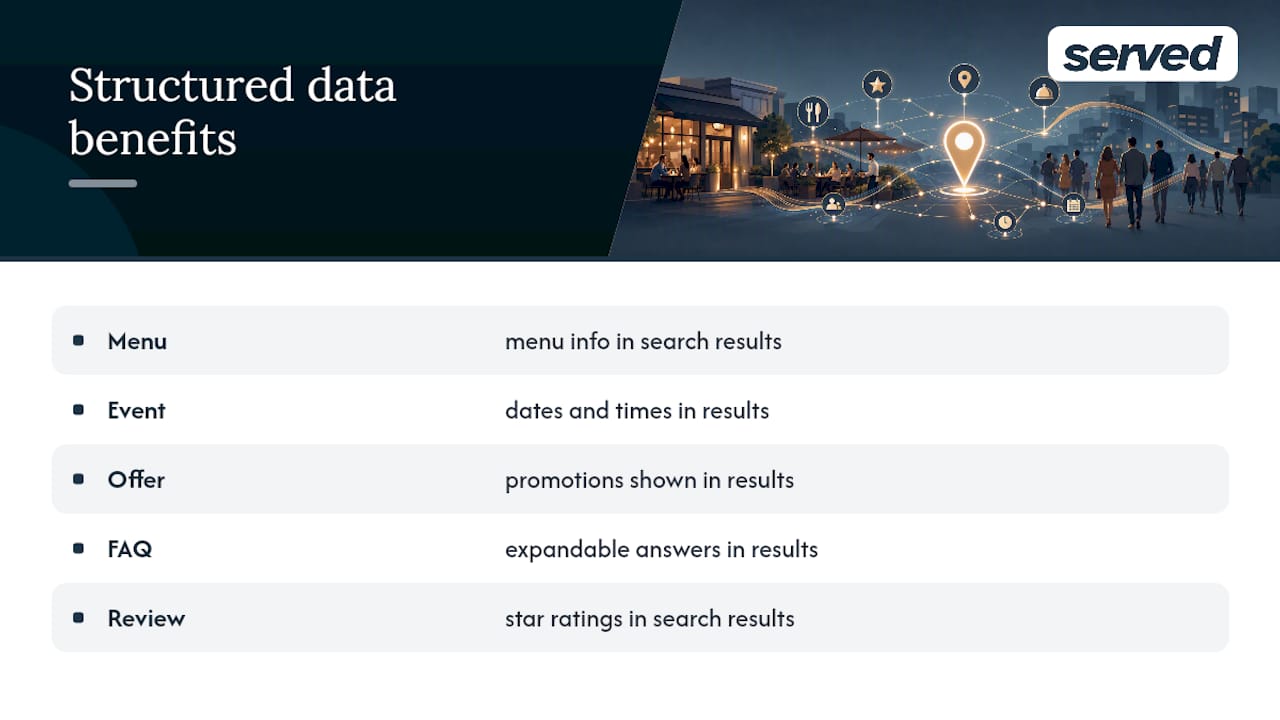
Offer schema works similarly for time-limited promotions like a lunch set menu or a festive booking package. Marking these up properly means Google can display the promotion directly in search results, rather than requiring a diner to click through and hunt for it.
FAQ schema on your website adds another layer, letting common questions about parking, dress code, or dietary accommodation appear directly in search results as expandable answers. This is especially useful for the voice and "near me" queries covered earlier, since assistants often pull directly from FAQ-marked content.
Review schema, distinct from the reviews living on your Google Business Profile, can also surface star ratings directly in your website's search listing. This isn't a replacement for GBP reviews, but it reinforces trust signals at every touchpoint a diner encounters.
None of this replaces a complete Business Profile. Structured data amplifies an already strong foundation; it doesn't fix a listing that's missing hours or has the wrong category.
What mobile experience do on-the-go diners actually need?
Someone searching for dinner while walking down a high street has different needs than someone browsing on a laptop at home. Speed matters more than almost anything else at this moment, since a page that takes more than a few seconds to load loses that decision to whichever competitor loads instantly.
Your phone number needs to be a tappable link, not plain text a diner has to copy manually. The same applies to your address, which should open directly into a maps app with one tap, and your booking button, which should sit above the fold rather than buried under a long scroll of history and philosophy about your kitchen.
Menus need to be readable without pinching and zooming. If a diner has to zoom in to read a price, that's friction at the exact moment they're deciding whether to walk in or keep scrolling to the next option.
Test your own site standing outside your restaurant on mobile data, not office WiFi. It's a different experience, and it's the one your actual customers are having every single day.
Where do restaurants actually get local backlinks?
Local link building looks different for a restaurant than it does for most businesses, because your natural sources are hyper local rather than industry-wide. Local food bloggers, neighbourhood news sites, and community event pages are far more valuable than a generic business directory nobody searches.
Sponsoring a local sports team, school event, or charity fundraiser often earns a genuine link from their website, along with real community goodwill that shows up in reviews too. Local tourism board listings and "best of" roundups from regional publications carry real weight, since they're geographically relevant and usually well established in search results themselves.
Partnering with nearby businesses for cross-promotion, a bakery recommending your restaurant for dinner reservations, or a hotel concierge page linking to venues nearby, builds the kind of local relevance that generic outreach never achieves. These links tend to come from genuine relationships rather than a cold pitch, so invest time in the neighbourhood relationships first and the links tend to follow naturally.
Press coverage from a genuine local story, a new chef, a menu launch, a community event you're hosting, works better than a generic press release sent nowhere in particular. Local journalists want a real hook, and a restaurant with an actual story tends to get covered over one that's simply announcing it exists.
A quick lesson from a common opening-week mistake
Plenty of new venues launch with a beautiful website and a half-finished Google Business Profile, then wonder why bookings lag. The fix is rarely the website. It's usually the empty fields nobody filled in on day one, and the reviews nobody asked for until week six.
— Ignacy Jurkowski
Served: get your fixes prioritised, not guessed at
This platform is a practical next step once you know what needs fixing, giving you a single place to manage the exact three things this guide covers: your menu, your booking flow, and your visibility. Instead of juggling a website update here and a directory correction there, it keeps real-time menu updates, commission-free booking, and human customer support in one platform, helping venues keep every reservation without hidden fees eating into the takings.
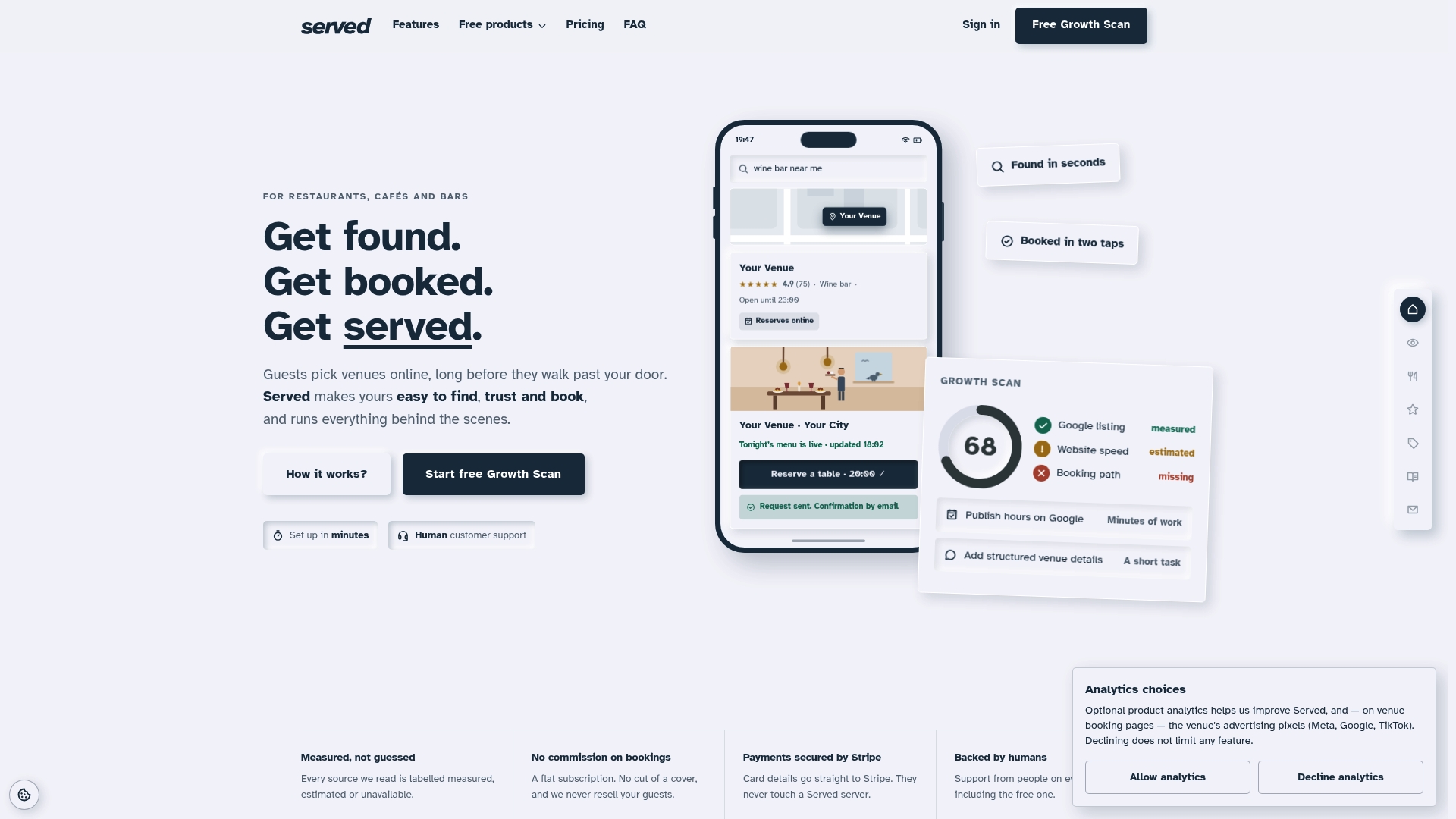
The free Growth Scan turns this whole checklist into a prioritised list specific to your venue, rather than a generic audit template. It flags exactly which GBP fields are empty, whether your menu is readable by search engines, and where your listings disagree with each other, so the fixes in this article become a short list rather than a guessing game. If you're already running bookings through another system, the switching guide walks through moving across without losing existing reservations. Run the free scan today and see which three fixes would move your visibility fastest.
Sources
- What 100,000 restaurant bookings reveal about how diners choose where to eat in 2026 | Modern Hospitality
- Google Business Profiles and local SEO success data | Search Engine Land
- Where are your customers really searching? - BrightLocal
- What influences diners' choices in 2026 | Modern Restaurant Management
FAQ
How much should I pay for local SEO?
Costs vary widely depending on whether you handle GBP and menu fixes yourself or pay for citation cleanup and content work; many of the highest-impact fixes, like completing your Business Profile, cost nothing but time.
What is a local SEO example?
A restaurant claiming its Google Business Profile, choosing "Neapolitan Pizza Restaurant" instead of just "Restaurant" as its category, and publishing an HTML menu with dish names matching real search queries is a working example of restaurant local SEO in practice.
What will local SEO look like in 2026?
Expect Business Profile completeness, review velocity, and AI-readable content like structured menus to matter even more, since AI tools increasingly shortlist venues before diners verify details on Google.
Can I do local SEO myself?
Yes. Most of the highest-return work, completing your Google Business Profile, publishing an HTML menu, and asking for reviews, needs no specialist skills, though a free tool like the Growth Scan helps prioritise where to start.