A music venue website has one job: turn a search into a confirmed, commission-free booking. That means four things working together: a booking flow you own, strong local discoverability, accessible design and a fast mobile experience. Get those right and the rest, menus, event pages, branding, and falls into place around them.
TL;DR:
- HOTREC’s 2018 study of 790 restaurants and 1,200 websites in France and Germany found nearly 43% of guests book ahead, mostly by phone or email.
- The EU Accessibility Act covers booking services from June 28, 2025; launch with keyboard access, labelled forms, image descriptions, and clear page structure.
- A minimal booking site typically takes 2 to 6 weeks; a full event catalogue plus staff training usually extends launch to 6 to 12 weeks.
- Track booking conversion by source, booking success, uptime, cancellations, and no shows separately; Google Business Profile insights also show searches and booking link clicks.
Table of Contents
- Essential features checklist for a venue website
- Make the venue discoverable: local listings, schema and SEO priorities
- Booking and reservation design that keeps revenue
- Accessibility and legal basics for venue booking websites
- Design, responsiveness and performance that convert on mobile
- Content and conversion: event pages, menus, FAQs and celebration bookings
- Analytics, monitoring and a realistic timeline and cost estimate to go live
- How Served fits this checklist
- Try it yourself: a practical next step
- A practical view on trade-offs
- FAQ
- Sources
Essential features checklist for a venue website
Before you touch design or colour palettes, nail the functional core. A venue site that hosts live music needs to handle bookings, events and day-to-day updates without friction, for the guest and for your staff.
- A booking or reservation flow with a calendar, instant confirmation and calendar sync, run on a commission-free model rather than a pay-per-cover platform.
- Event listings with ticketing or RSVP options, each on its own page with doors time, line-up and cover charge.
- A visible booking call-to-action and clear contact details on every page, not buried in a footer.
- Real-time menu management so opening hours, specials and sold-out items stay accurate.
- Basic guest CRM with consent capture, so you can email or text about upcoming gigs without breaching data rules.
Each of these supports the same outcome: fewer abandoned bookings and less manual admin on a Friday night.
Make the venue discoverable: local listings, schema and SEO priorities
Discoverability decides whether anyone reaches your booking flow at all. Most searches for "live music near me" or "venue with gigs tonight" are won or lost in local search before a visitor even opens your homepage.
- Verify and enrich your Google Business Profile, keeping photos, categories, menu links and booking links current.
- Add structured data to event pages so search engines can surface dates, times and ticket availability directly in results.
- Keep your name, address and phone number consistent everywhere you're listed, and collect reviews steadily rather than in bursts.
- Track which listing sources actually convert to bookings, then spend more time on those and less on the rest.
Google's own profile tools report search and click performance for menu views and booking taps, which gives you a direct read on whether your local listing is pulling its weight.
Booking and reservation design that keeps revenue
The booking flow is where commission-free design pays for itself. A well-built flow confirms instantly, syncs to your calendar and gives you options for deposits without pushing guests through a clunky third-party redirect.
- Offer immediate confirmation, with an optional deposit or card-on-file for busy gig nights.
- Sync bookings to a shared calendar so front-of-house and kitchen see the same picture in real time.
- Check any provider's payment integration and refund flow before committing. A subscription model protects your margin in a way a per-booking commission never will.
- Map the booking flow to your actual floorplan, so a table held for a four-piece band's guest list doesn't double as a walk-in table.
- Keep a phone fallback for guests who won't book online, and train staff to log those bookings into the same system.
Direct bookings matter more than most owners assume. A 2018 HOTREC study of 790 restaurants and 1,200 restaurant websites in France and Germany found that close to 43% of guests book in advance, with most of those advance bookings still made directly by phone or email rather than through a third-party platform. That gap is the opportunity: a venue with its own booking flow captures demand that would otherwise go through a commissioned middleman, or get lost to a phone call nobody answers in time.
Accessibility and legal basics for venue booking websites
Accessibility isn't a side project, it's a design requirement with a legal backbone in the EU and a genuine revenue case everywhere else. The European Accessibility Act became binding across EU member states from 28 June 2025, and it brings accessibility requirements to booking and e-commerce services, which puts most venue reservation systems squarely in scope. Travel and hospitality sites are flagged as having some of the most frequent accessibility problems, and European Disability Expertise estimates that a significant share of the EU population over 16 has a disability, so the audience you're excluding by ignoring this is not small.
- Perceivable content: alt text on images, captions on video, sufficient colour contrast.
- Full keyboard operability for every interactive element, including the booking widget.
- Clear heading structure and logical page order, so screen readers make sense of the page.
- Accessible booking forms with labelled fields and ARIA-friendly components.
Guidance from EU technical regulation notification recommends building accessibility in from the start rather than retrofitting it, publishing an accessibility statement, and keeping technical documentation up to date as the site evolves. A practical accessible events checklist is a useful companion when you're mapping these priorities against your own event pages.
Pro Tip: Run your booking form through a screen reader once before launch. It's the fastest way to find the fields nobody can actually complete.

Design, responsiveness and performance that convert on mobile
Most guests booking a table for a gig night are doing it on a phone, often one-handed, often with patchy signal outside a venue. Your design has to assume that, not just tolerate it.
- Build mobile-first, with a single, obvious booking button and the fewest form fields you can get away with.
- Optimise images and defer non-essential scripts so the page renders fast on a slow connection.
- Make the booking flow resilient to a dropped connection, with a clear progress indicator and an unambiguous confirmation screen.
- Test on real phones, not just a browser's device emulator, and watch real-user data for where bookings stall.
Similar lessons apply outside hospitality. Escape room operators tackling ADA website compliance for their own booking widgets found that the same principles, simple forms, resilient flows, clear confirmation, carry across any venue that sells timed slots rather than physical goods.
Content and conversion: event pages, menus, FAQs and celebration bookings
Good content does the persuading your booking button can't do alone. Each page type has a job.
- Event pages need the line-up, ticket or cover details, doors and start time, an indication of expected audience and a booking call-to-action above the fold.
- Menu pages should be written for conversion and local search, linked to relevant events where a themed menu runs alongside a gig.
- A private hire form needs clear pricing bands, lead times and a direct contact point, not a generic "get in touch" link.
- Microcopy should reassure: confirmation wording, cancellation policy and a note on accessibility for anyone booking a seat near the stage.
None of this needs to be clever. It needs to answer the three questions every guest has before they book: what's on, what it costs, and what happens if plans change.
Analytics, monitoring and a realistic timeline and cost estimate to go live
You can't improve what you don't measure. Track booking conversion rate, which sources those bookings come from, organic traffic on event pages, and your no-show rate separately from your cancellation rate.
- Monitor uptime and booking success rate, not just whether the site loads.
- Watch Google Business Profile insights for search and click trends on your booking and menu links, using the performance metrics in Google's own tools.
- Budget 2 to 6 weeks for a minimal, booking-enabled launch, and 6 to 12 weeks if you're building a fuller event catalogue and training staff on a new system.
- Compare a DIY-plus-subscription route against a bespoke build. The subscription route tends to keep your bookings genuinely commission-free.
A single on-site reservation system was present on only a small share of the restaurant websites HOTREC's study examined. Most of the market is still leaving direct bookings on the table.
How Served fits this checklist
We built our platform around exactly this checklist. We run on a flat subscription model and provide access to real human support rather than a ticketing queue. Our free Growth Scan audits your current visibility and booking path, so you can see where you're losing guests before you change anything. Real-time menu updates help keep your site accurate on a busy night, and onboarding is designed to be fast and accessible for teams without a technical background. If you run a bar, café or restaurant that hosts music nights, these pieces map directly onto the booking flow, discoverability and menu-management priorities above.

Try it yourself: a practical next step
Running a venue that hosts music means less time to rebuild a website from scratch, which is exactly why we built a route that doesn't require it. Our free tools let you check your current booking path and visibility in minutes, with no sales call required first.
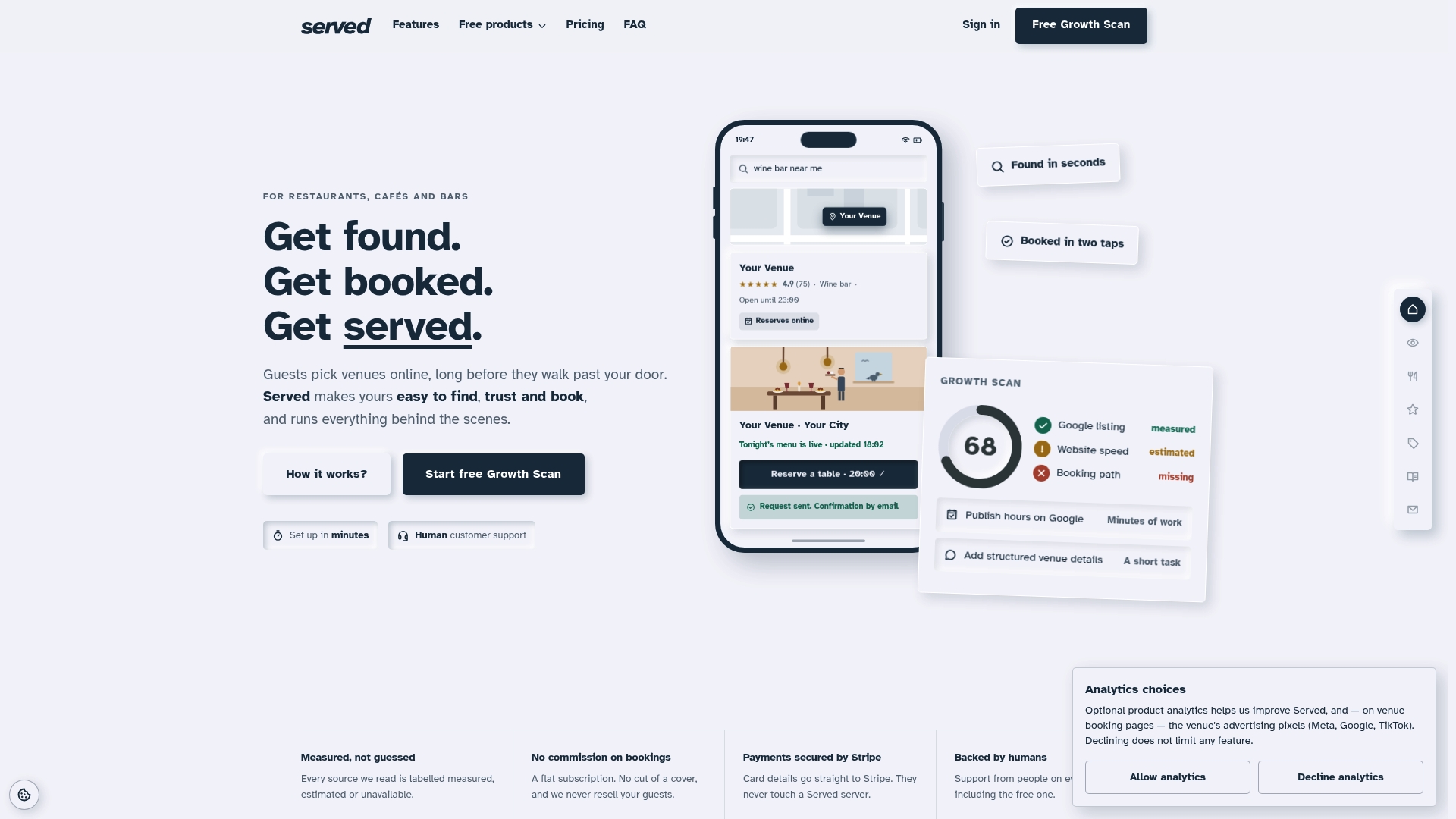
If you want the full picture, the Booking Path Scan gives you a direct read on where bookings are slipping through today. From there, Visibility Brain is priced at €69 per month or €660 per year and adds the discoverability and booking tools this guide covers.
| Action | What it gives you | Where to start |
|---|---|---|
| Run a Growth Scan | A visibility and booking-path audit | Served |
| Try the free tools | Quick checks on discovery and booking | Served |
| Subscribe to Visibility Brain | Commission-free bookings plus visibility tools, from €69/month | Served |
A practical view on trade-offs
Most venues don't need a bespoke build. They need a booking flow they own, clear event pages, and staff who know the process cold. Speed beats customisation almost every time, and measurement beats guesswork. A simple standard operating procedure for taking a phone booking, written down and followed by every shift, often does more for revenue than another redesign.
— Ignacy Jurkowski
FAQ
How long does it take to launch a booking-enabled venue website?
A minimal, booking-enabled site typically takes 2 to 6 weeks to launch. A fuller build with a complete event catalogue and staff training on the new booking flow usually takes 6 to 12 weeks.
Does a venue website need to meet accessibility requirements?
Yes, in the EU the European Accessibility Act applies to booking and e-commerce services and became binding from 28 June 2025. Beyond legal scope, accessible design also reaches a meaningfully wider pool of potential guests.
What does Served cost for a venue booking website?
Our Visibility Brain plan is €69 per month or €660 per year, and a Free plan is also available. The Booking Path Scan and OmniBrain plan don't have published prices, so get in touch directly for those.
Why do most restaurants still take bookings by phone instead of online?
Many venues never built their own reservation system, relying instead on phone calls or third-party platforms. A 2018 HOTREC study found only around 11% of the restaurant websites it examined had their own on-site reservation system.
How do I make my Google Business Profile drive more bookings?
Keep your address, hours, menu links and booking links current, and check the performance insights Google provides for searches and clicks. Google's own support documentation covers each of these settings in detail.
Sources
- Time to check-out… the European Accessibility Act and its impact on travel, hospitality and leisure - Lexology
- HOTREC restaurant booking study (May 2019)
- Get started with a Business Profile - Google Business Profile help
- Guidelines on accessibility (technical regulation notification)